Only units can be purchased per person at this time, sorry for the inconvenience.
Selling fast! Only left.
Thank you! We will email you as soon as this item is available again.
Thanks for registering!
Added to Cart!
SPOTLIGHT DEALOFFRE SPOTLIGHTSPOTLIGHT-ANGEBOT
Unlock 50% OFF these products with this purchase of a Panel Starter Kit:Profitez de -50 % sur ces produits avec l’achat d’un kit de démarrage de panneaux :Sichern Sie sich 50 % Rabatt auf diese Produkte beim Kauf eines Panel Starter-Kits:
*Spotlight deal prices shown above are with the discount applied. Discount will be applied automatically at final checkout.Les prix Spotlight affichés ci-dessus incluent déjà la remise. La réduction sera appliquée automatiquement lors du paiement final.Die oben angegebenen Spotlight-Preise enthalten bereits den Rabatt. Der Rabatt wird automatisch beim Bezahlvorgang angewendet.
Can I control the Pegboard Desk Dock with a mobile app?
The Pegboard Desk Dock is not compatible with mobile apps (like the Nanoleaf Mobile App or other smart home ecosystem apps).
It is a computer only product, and works on both Mac and Windows computers with the Nanoleaf Desktop App.
2
Can I connect it to any USB-C port?
It must be connected to a Computer USB-C port (Windows or Mac) The port must support both data and power. If the port only supports power, it will not work with the Nanoleaf Desktop App.
Pegboard Desk Docks can also be connected to one another (daisychained) as long as at least 1 is connected to a Computer USB-C port.
3
What USB ports does it have?
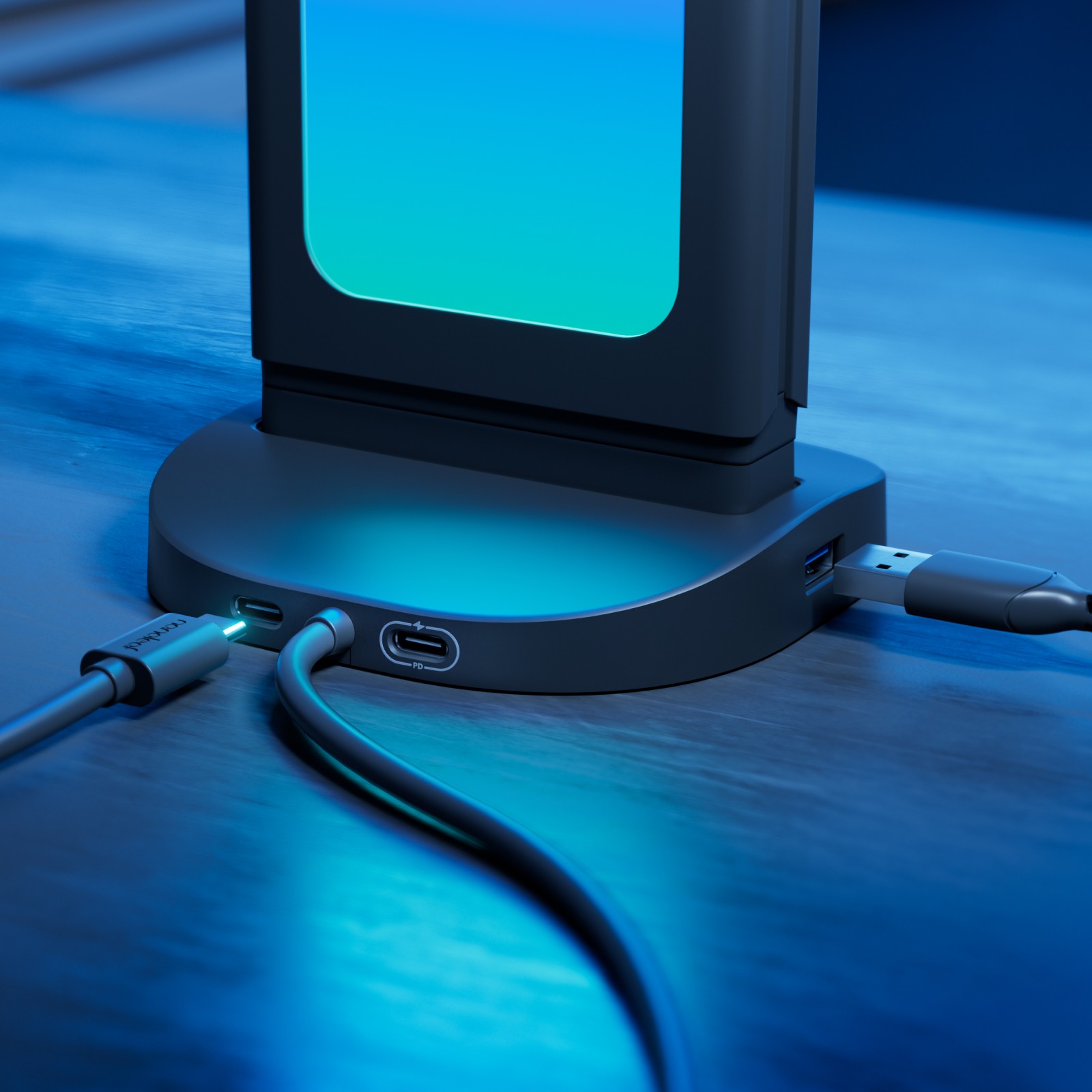
The Pegboard Desk Dock has: 2× USB-C (Output, 5V DC) 1× USB-A (Output, 5V DC) 1× USB-C PD Input Port (Input, 9V)
Note: The PD (Power Delivery) Input Port is INPUT only, used to supply additional power to the Pegboard Desk Dock when needed for connecting high power devices like webcams, microphones, multiple Pegboard Desk Docks, RGB keyboards, etc. You can power it by via any standard USB-C power cable connected to a power source, like a standard wall plug phone charger (not included).
4
Can I connect multiple Pegboard Desk Docks together?
Yes! You can daisychain them but you will require an additional power source.
Connect your first Pegboard Desk Dock to your Computer USB-C port, and then plug second Pegboard Desk Dock into the USB-C port on the first. You will need to plug in an additional* power supply or charger (in addition to being plugged into your computer) to the PD Input Port on the Pegboard Desk Dock base.
View our online user manual for more detailed instructions.
Alternatively, you can connect each Pegboard Desk Dock directly to separate Computer USB-C ports.
5
What is the maximum weight the Hooks can hold?
The maximum weight capacity is 1.5kg (3.3lbs).
6
Can I connect it to Google Home, Apple Home, Alexa or SmartThings?
No, the Pegboard Desk Dock is designed exclusively for the Nanoleaf Desktop App and does not support integrations with smart home platforms like Google Home, Apple Home, or SmartThings.
7
Can I use the Pegboard Desk Dock with both Mac and Windows computers?
Yes the Pegboard Desk Dock is compatible with both Mac and Windows.
8
Can I control the Pegboard Desk Dock together with my other Nanoleaf lights?
Yes, they can all be controlled together through the Nanoleaf Desktop App.
9
Can the Pegboard Desk Dock display regular colours and Scenes in addition to Screen Mirroring?
Yes, the Pegboard Desk Dock can display colours and Scenes with the Nanoleaf Desktop App, and can also access other Nanoleaf Desktop features like Orchestrator and Scenescapes.
10
Can I screen mirror content from a streaming service like Netflix?
Some streaming services—like Netflix, Disney+, and Prime Video—may have copyright protection restrictions in place that block any type of screen capture, recording, or mirroring on devices. In these select cases Screen Mirroring is not possible, but outside of these services, any other content that can be displayed on your screen can be mirrored onto your lights.
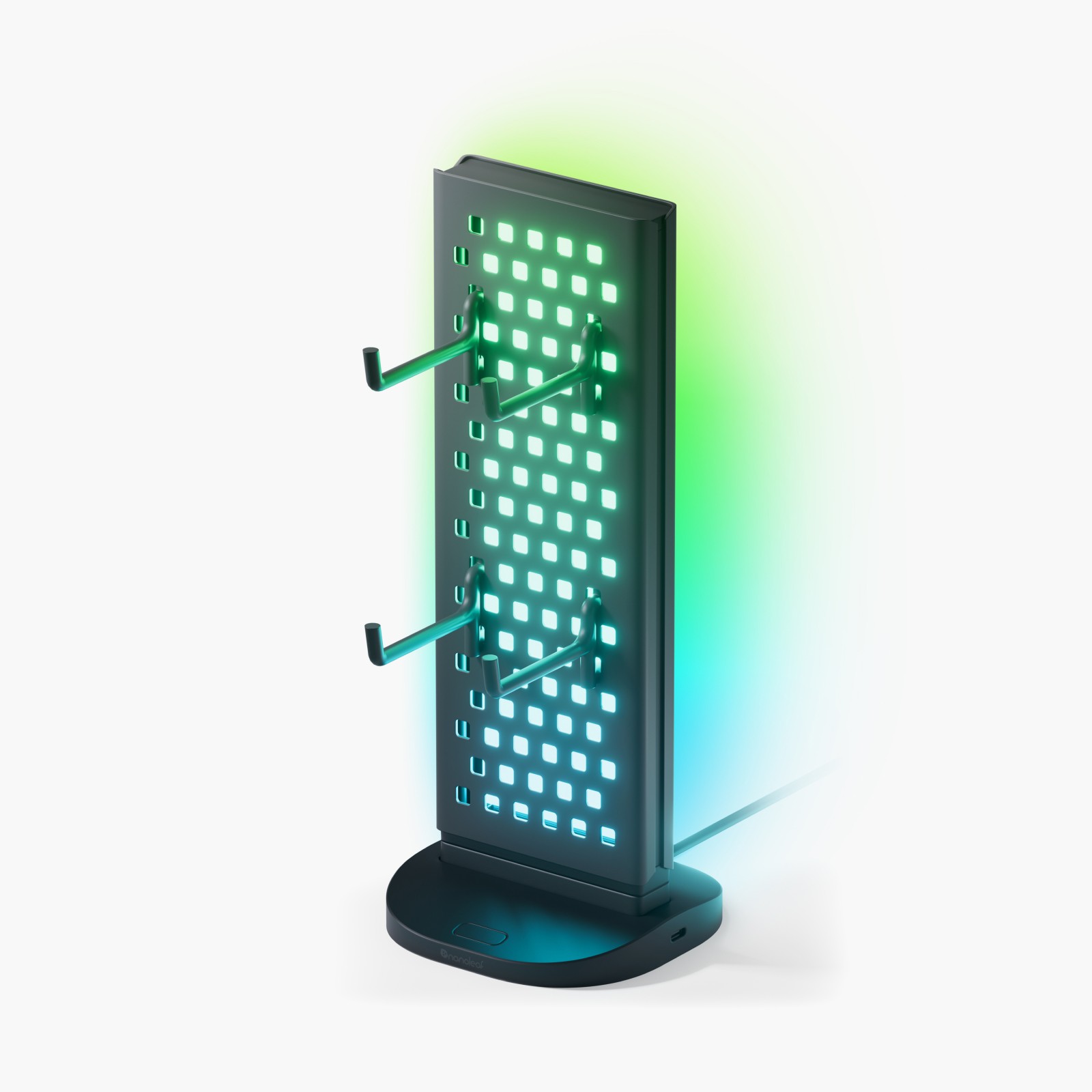
Conquer your desk with the Nanoleaf Pegboard Desk Dock—a versatile 3-in-1 hub that blends vibrant lighting effects, practical storage, and seamless connectivity into one sleek package.
A New Take On Desktop Lighting
Bring your setup back to the future with dynamic animated Scenes that reimagine the vibey retro "Lava Lamp", the ultimate zen "Waterfall", the classic music visualizer "Digital Dream", and more.
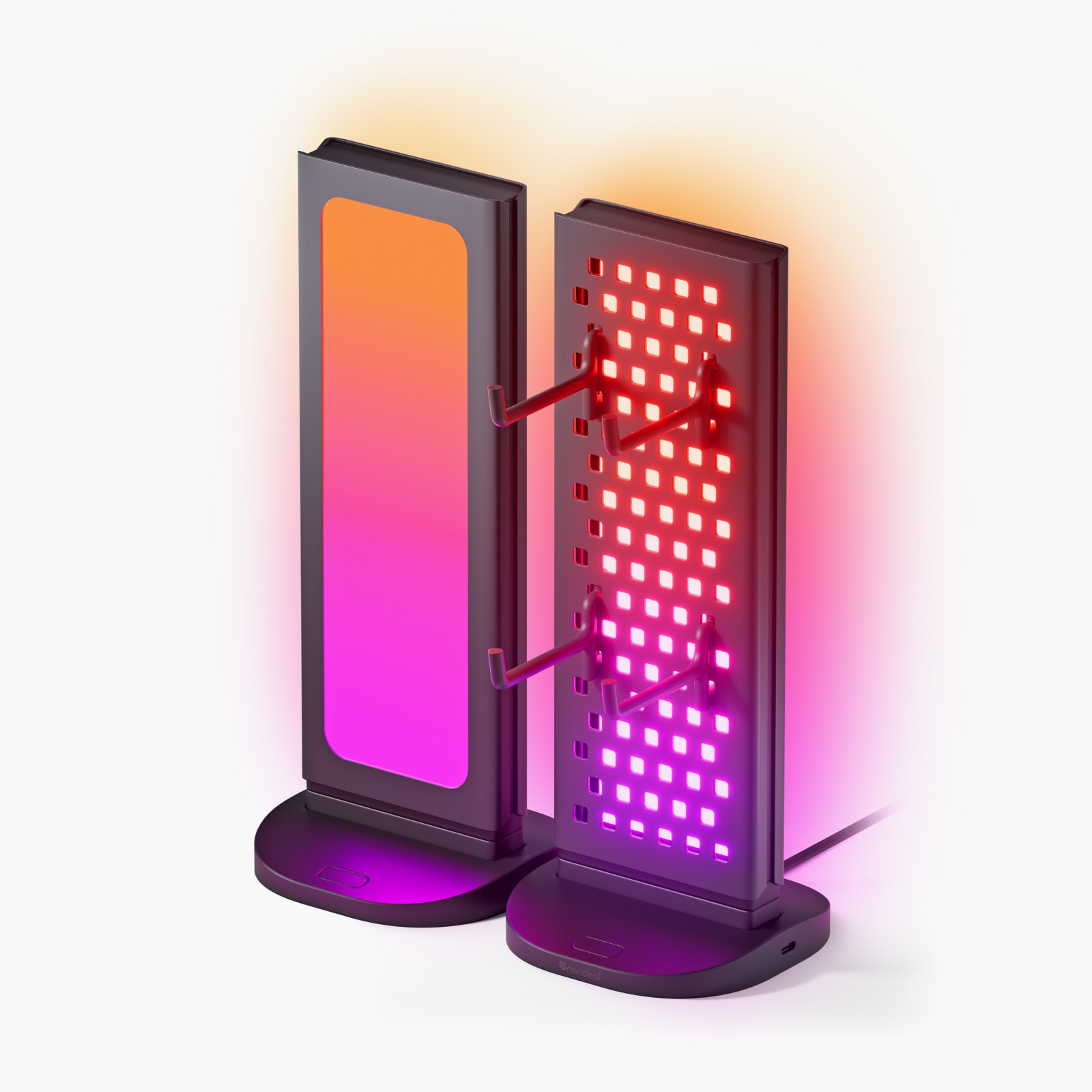
Dual Faced Lighting
Use the light pegboard side to store & display accessories, or turn 180º for full-faced lighting effects. Simply click, lift & rotate!
Store Your Stuff
Keep your desk clear while still having your accessories close at hand for easy access, or use as a charging station for your devices via USB A or C.
Connect Your Peripherals
Charge, power, and control your peripherals and other devices with 3 built-in ports in each Pegboard Desk Dock.
1 x USB-A Port
2 x USB-C Port
Additional power input is required when connecting high-power devices like webcams, microphones, multiple Pegboard Desk Docks, RGB keyboards, etc.
Plug & Play with Nanoleaf Desktop App
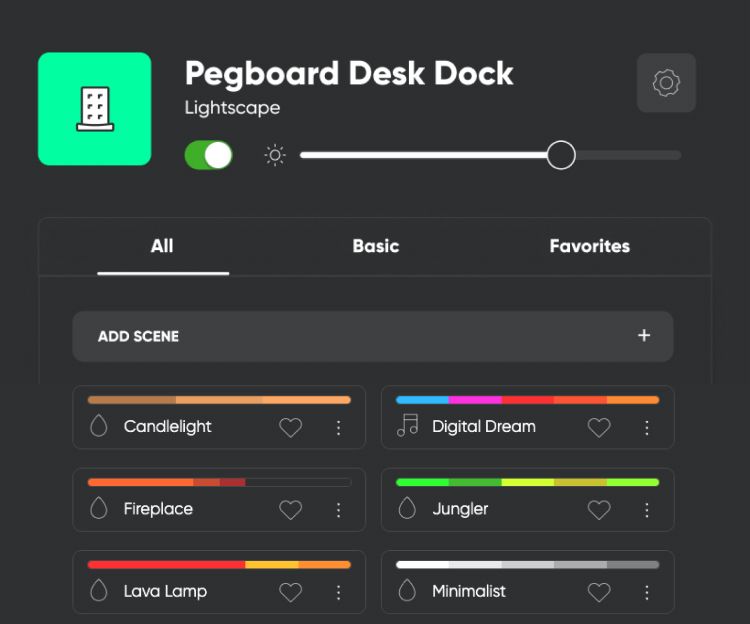
Pair with the Nanoleaf Desktop App instantly just by plugging your Pegboard Desk Dock into your computer to access the full suite of Nanoleaf features.
Customise Colours & Scenes
Choose from 16M+ ambient colours, or create your own Scenes with dynamic animated motions and palettes for a completely custom look.
Immersive Gaming Sync
Use screen mirroring effects to extend the colours of your favourite games beyond the screen, or sync your lights to react to in-game events for an ultra-immersive experience. Game your way with integrations with Razer Chroma, Overwolf and more.
Music Sync with Direct PC Audio Capture
Bring your music to life with lightshows synced to the beat of your music.
Try the Orchestrator feature for intelligent music visualisations curated for each song based on real-time song detection and analysis algorithms.
Check your Mac’s processor type under Apple Menu > About This Mac.
Macs with Apple Silicon (M1, M2, or later) need the Mac (Apple Silicon) version.
Macs with Intel processors require the Mac (Intel) version.
You Might Also Like
We respect your personal privacy
This website uses first and third party cookies to personalise your experience, analyse web traffic data, and optimise performance. We never sell your data to third parties. Privacy Policy.
All data collected and processed is handled in accordance with our privacy policy. We do not sell your personal information to third parties, and collected data is anonymised and aggregated to cohorts wherever possible. "First Party" cookies refers to data usage on this website, and generally cannot be disabled without breaking core functionality. "Third Party" cookies refers to cookies which are stored in your browser and accessible by a third party vendor. Please see the appropriate tabs for more information.
First Party Usage
Third Party Usage
Data Vendors
Essential Functions & Legitimate Interest
The below services are essential to the function of this website, and cannot be disabled without breaking your browsing experience. They're designed to process data in your browser only ("first party"), and to not transmit information to our servers or to third party servers (with the exception of if you choose to log into our website, as explained in more detail below).
Data Exchange With Third Parties
The below services and use cases refer to direct agreements with third-party vendors which may process data (processors) on our behalf (as a sub-processor). We take care to select vendors who have appropriate protections in place around the handling of personally-identifiable information, and describe the related interactions in plain language to the best of our ability. Links to vendor privacy policies and vendor opt-outs can be found in the "Data Vendors" section.
Google Analytics
We use Google Analytics to analyse aggregate behaviour on our website, with the goal of using these aggregated data sets to improve user experience, website performance, and relevance of the content that we publish. We do not use the user-id-session collection function, and do not analyse individual user sessions using Google Analytics. We do create remarketing lists with Google Analytics, which at aggregate are used to improve the relevance of paid advertising for users who have not opted out of data collection with Google (please see the "Data Vendors" tab for opt-out instructions). These lists cannot be used by Nanoleaf to personally identify you. On the European locales of our website, IP addresses are anonymised by local servers before data is processed by Google Analytics. Please note that anonymised data may be sent to these third countries : United States, Canada, Hong Kong.
Data is Anonymised : Yes Data Storage Locations : France, Canada, United States, Hong Kong Data Usage Purposes : Technical Analysis, Marketing To disable the collection of data for processing with Google Analytics, you can install the opt-out tool here
Google Optimise
We use Google Optimise to analyse aggregate visitor preferences and help determine whether the content which we publish on our website is useful for visitors. This includes "A/B" and "Multivariant" tests of content and website design/layout. The information collected through this analysis is of an aggregate, anonymous nature (user-id-session is not collected).
Data is Anonymised : Yes Data Storage Locations : France, Canada, United States, Hong Kong Data Usage Purposes : Technical Analysis, Marketing
Google Ads
We use Google Ads to promote our products and services in various countries, including the United Kingdom and the member states of the European Union. Ad products which we utilise include AdWords (text and search), Display (banner), and various formats of video advertising units on YouTube. Google Ads is a subprocessor of aggregate data collected via Google Analytics and shared with Google Ads in an anonymised manner (user-id-session is not transmitted, since it is not collected). Ad personalization signals are disabled by default for users in the EU and UK. This prevents the use of remarketing and retargeting advertisements unless a visitor has opted in for this use.
Data is Anonymised : No Data Storage Locations : Canada, United States, Hong Kong Data Usage Purposes : Marketing Google's privacy policy can be found here
Facebook Connect
We use Facebook Connect to record behavioural activity related to sales, and to improve the relevance of marketing and advertising to "look-alike cohorts". In practice, this means that an anomymous Facebook user-id is generated after the completion of a sale and sent to Facebook to attribute against a set of user data in their posession. At aggregate, this data is used to improve the targeting of advertising to visitors on Facebook, Instagram, and other properties owned by Meta (primarily by identifying "like" users on these platforms who may find the advertisements relevant).
Data is Anonymised: No Data Storage Locations: United States Data Usage Purposes: Marketing Facebook's privacy policy can be found here
Twitter Connect
We use Twitter Connect to record certain behavioural actions on Twitter (for example, link clicks to our website) and analyse the associated behaviours on our website with the goal of improving the experience that visitors have, and determine which content is relevant. This data is aggregated and anonymous in nature, individual user sessions are not analysed and Nanoleaf cannot attribute this data to its own personally-identifiable data stored in user accounts for Nanoleaf services.
Data is Anonymised: No Data Storage Locations: United States Data Usage Purposes: Marketing Twitter's privacy policy can be found here
Funnelytics
We use Funnelytics to determine the success of marketing campaigns in aggregate, on narrowly-defined sets of website landing pages and purchase checkouts. This data is aggregated and anonymous in nature, and cannot be used by Nanoleaf to personally identify a visitor to our website.
Data is Anonymised: Yes Data Storage Locations: Canada Data Usage Purposes: Marketing Funnelytics' privacy policy can be found here
Shopify
We use Shopify to process purchases on our website in a PCI DSS compliant checkout environment which meets PSD2 requirements as required by law in the European Union. All payment transactions are processed in France, and are compliant with national law as well as the regulations proscribed by the European Commission. When you make a purchase on the Nanoleaf Shop, data essential to the processing and fulfilment of your purchase is shared with Shopify (the processor) and accessed by Nanoleaf as required to fulfil your order (the sub-processor). Purchase data is aggregated and processed by Nanoleaf for reporting purposes (these reports are not shared with other parties under any circumstances). Personally-identifiable information is used only to provide order fulfilment and customer service (either at your request, or proactively when we identify in advance service or logistics disruptions which may impact you). All data collected and stored on Shopify's servers is subject to the right to be forgotten, and you may request deletion of such data at any time by contacting us to initiate the request on your behalf. After a request has been initiated, Shopify will communicate with you directly solely in regards to the progress of your data deletion request. Please see the ""Data Vendors"" section for more information.
Data is Anonymised: No Data Storage Locations: France, Canada, Hong Kong, Japan, Vietnam Data Usage Purposes: Order Processing and Fulfilment Please note that personally-identifiable information for EU and UK customers is stored in France, and may be sub-processed in Canada. This data is not stored in the other locations listed (rather, the data for customers in those regions is stored locally). To submit a right to be forgotten request, please contact Nanoleaf Support More information on how Shopify manages GDPR compliance and deletion requests is available here
Brevo
We use Brevo to provide certain transactional and marketing-related email or SMS communications with your explicit permission (the opt-in mechanism required when signing up for a contact list on our website). At our direction, Breco facilitates the communication of commercial and non-commercial messages based on the permissions which you gave during the sign-up process. Some examples include limited-time promotions, general company news and updates, or product-specific news and updates related to devices which you have indicated that you own (or have purchased through the Nanoleaf Shop on our website). All data collected and stored on Brevo's servers is subject to the right to be forgotten, and you may request deletion of such data by contacting us. Personally-identifiable information is limited to your contact record, which only includes information which you have volunteered during the signup process (common data attributes are name, email address, country of domicile, language preference, and products owned).
Data is Anonymised: No Data Storage Locations: France Data Usage Purposes: Marketing, Non-Marketing Communications To submit a right to be forgotten request, please contact Nanoleaf Support More information on how Brevo manages GDPR compliance is available here
Gorgias
We use Gorgias to facilitate customer service, order support, and technical support interactions via LiveChat on our website, telephone (IP telephony), social media messaging, and email messaging. Personally-identifiable information is required to facilitate these interactions, which includes your email address and (optionally) your name and telephone number. Order reference numbers and device serial numbers are also commonly requested to facilitate such interactions, although these cannot be used in isolation to personally identify you. Gorgias stores your contact details and case history, which enables us to provide better (and more expedient) customer service in the future. You can request deletion of any case or your case history at any time by contacting us.
Data is Anonymised: No Data Storage Locations: United States Data Usage Purposes: Customer Service To submit a right to be forgotten request, please contact Nanoleaf Support More information on how Gorgias manages GDPR compliance is available here
Pinterest
We use Pinterest Ads to measure, report on and improve the performance of ads on Pinterest, or to figure out what kinds of ads to show customers on or off of Pinterest. This includes information about your visits to our site or purchases you made from us, or information about your interests from a third-party service, which we might use to help show you ads. You can control how we use this information to personalise your experience and the ads you see on Pinterest in your Privacy and Data Settings.
Data is Anonymised: No Data Storage Locations: United States Data Usage Purposes: Marketing Pinterest's privacy policy can be found here
TikTok
We use TikTok Ads to promote our products and services in various countries.TikTok shares information with advertisers and third-party measurement companies to show how many and which users of the Platform have viewed or clicked on an advertisement. If you use the TikTok Lite version of TikTok, information is shared with advertising networks to display personalised advertisements to you on the TikTok Lite app and elsewhere online. TikTok stores and processes data in accordance with their privacy policy.
Data is Anonymised: No Data Storage Locations: United States and Canada Data Usage Purposes: Marketing TikTok's privacy policy can be found here
We think there might be a better match for your location and language :) You can set these below for local prices and the fastest delivery.Wir glauben, dass es für Ihren Standort und Ihre Sprache eine bessere Übereinstimmung geben könnte :) Diese können diese unten einstellen, um lokale Preise und die schnellste Lieferung zu erhalten.Nous pensons qu’il pourrait y avoir de meilleurs résultats correspondant à votre emplacement et à votre langue :) Vous pouvez les préciser ci-dessous pour avoir une idée sur les prix locaux et les meilleurs délais de livraison.Potrebbe esserci una corrispondenza migliore per la località e la lingua da te scelta :) Impostale qui sotto per i prezzi a livello locale e una consegna più rapida.お客様の地域や言語によりピッタリのウェブページをお選びください :)以下から、現地の価格や最短の配信をご設定いただけます。귀하의 위치와 언어에 더 적합한 매치가 있으리라 생각합니다. 지역 금액 및 가장 빠른 배송을 위해 귀하는 위치와 언어를 아래에서 설정할 수 있습니다.使用自己的位置和語言肯定更順手吧:)您可以在下方設定這些選項,並取得當地價格與最快的交付。











 Free shipping over 1000 HKD購物滿 1000 HKD 免運費
 Free Technical Support
 2 Year Warranty i
 Windows
 MacOS
MacOS